
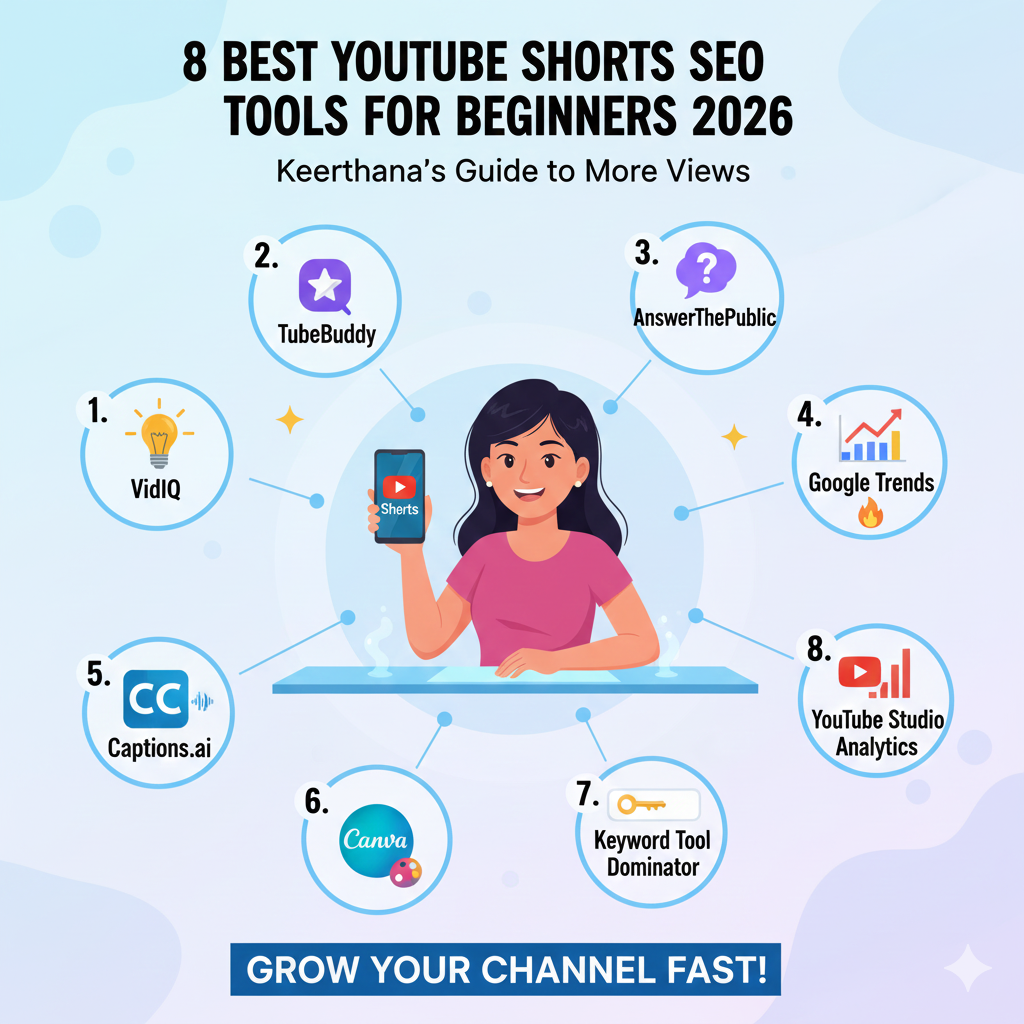
Finding the best YouTube shorts SEO tools is the secret to growing your channel fast in 2026. Keerthana knows that for beginners, the world of video ranking can feel like a puzzle. You want more views, but you do not want to spend hours guessing which hashtags to use. This guide will show you the top 8 tools to master YouTube shorts without any stress. Keerthana has picked these because they are easy, powerful, and perfect for new creators. If you follow these tips, your YouTube shorts will have a much better chance of going viral.
Contents
- 1 Why You Need SEO for Your YouTube Shorts
- 2 1. VidIQ: The Best All-in-One Helper
- 3 2. TubeBuddy: The King of A/B Testing
- 4 3. AnswerThePublic: Find What People Ask
- 5 4. Google Trends: Spotting Viral Waves
- 6 5. Captions.ai: Boost Your Watch Time
- 7 6. Canva: For Clickable Thumbnails
- 8 7. Keyword Tool Dominator: Deep Keyword Research
- 9 8. YouTube Studio Analytics: Your Best Free Tool
- 10 Keerthana’s Tips for Better SEO
- 11 Summary Table of Best Tools
- 12 Frequently Asked Questions
Why You Need SEO for Your YouTube Shorts
Many people think YouTube shorts only work by luck. They believe the algorithm just picks random videos to show people. Keerthana is here to tell you that is not true. While the “Shorts Feed” is very fast, the way your video gets into that feed depends on data.
When you use the right tools for YouTube shorts, you are giving the system clues. You are telling it exactly who should watch your video. Keerthana has found that even a simple keyword in your title can change everything. If you want to build a long-term brand, you cannot ignore SEO for your YouTube shorts.
1. VidIQ: The Best All-in-One Helper
VidIQ is a favorite for Keerthana because it does almost everything. It has a special tool just for YouTube shorts that helps you find trending topics. When you are a beginner, you might not know what people are searching for. VidIQ shows you the “Search Volume” and how hard it is to rank.
Keerthana loves the “Daily Ideas” feature. It uses AI to look at your channel and suggest three new ideas for YouTube shorts every single day. This keeps you from running out of things to film. For anyone starting out with YouTube shorts, VidIQ is like having a professional coach in your pocket.
2. TubeBuddy: The King of A/B Testing
TubeBuddy is another heavy hitter that Keerthana recommends. It has a great browser extension that sits right inside your YouTube dashboard. One of the best parts about TubeBuddy is how it helps you with tags for YouTube shorts. It suggests tags that other successful creators are using.
Keerthana also points out that TubeBuddy is great for bulk editing. If you have fifty YouTube shorts and want to change the link in the description, you can do it all at once. This saves you a lot of time. Keerthana believes that TubeBuddy is essential for beginners who want to stay organized.
3. AnswerThePublic: Find What People Ask
Sometimes the best YouTube shorts are the ones that answer a question. AnswerThePublic is a unique tool that Keerthana uses to find out what people are wondering about. You type in a topic, like “cooking,” and it shows you a giant map of questions like “How to cook pasta fast?” or “Why is my cake dry?”
Keerthana suggests using these questions as the titles for your YouTube shorts. When you answer a real question, people are more likely to watch until the end. This is a great way to get high retention on your YouTube shorts. Keerthana says this tool is a goldmine for educational creators.
4. Google Trends: Spotting Viral Waves
If you want your YouTube shorts to explode, you need to catch a trend. Google Trends is a free tool that Keerthana checks every morning. It shows you what is getting popular in real-time. You can filter the results specifically for “YouTube Search.”
Keerthana recommends looking for “breakout” terms. If a new dance or a new tech gadget is trending, make YouTube shorts about it immediately. Being early is a huge advantage. Keerthana knows that the YouTube shorts algorithm loves fresh content that matches what the world is talking about right now.
5. Captions.ai: Boost Your Watch Time
Did you know many people watch YouTube shorts with the sound off? Keerthana says this is why captions are so important. Captions.ai is an app that automatically adds big, colorful words to your video. It makes your YouTube shortslook professional and keeps people watching.
The SEO benefit is that the words in your video help the AI understand your content better. Keerthana finds that videos with dynamic captions have much higher engagement. If you want your YouTube shorts to stand out in a crowded feed, this tool is a must-have.
6. Canva: For Clickable Thumbnails
Even though YouTube shorts often play automatically, people still see your thumbnails on your channel page and in search results. Keerthana uses Canva to make bright, clear images. You don’t need to be an artist to use it.
Keerthana suggests using high-contrast colors and very little text. Since the screen is small, your thumbnail needs to be easy to read at a glance. A good thumbnail can lead to more clicks from the “Suggested” area. Keerthana believes that every beginner making YouTube shorts should have a free Canva account.
7. Keyword Tool Dominator: Deep Keyword Research
If you want to go deeper into research, Keyword Tool Dominator is a great pick. Keerthana likes this tool because it mimics the YouTube autocomplete feature. It gives you long-tail keywords that other tools might miss.
For example, instead of just targeting “fitness,” Keerthana might find “5-minute fitness for busy moms.” This specific phrase is much easier for a beginner to rank for. Using specific keywords helps your YouTube shorts find the right niche quickly. Keerthana says this is the “secret weapon” for small channels.
8. YouTube Studio Analytics: Your Best Free Tool
The last tool Keerthana wants to mention is the one you already have. YouTube Studio Analytics is powerful. Keerthana suggests looking at the “Reach” tab to see which search terms are bringing people to your YouTube shorts.
If you see a keyword you didn’t expect, make another video about it! Keerthana calls this “doubling down.” By listening to your own data, you can grow your YouTube shorts faster than by using any outside app. Keerthana reminds you that your audience is giving you all the answers you need.
Keerthana’s Tips for Better SEO
Using tools is great, but you also need a good strategy. Keerthana has a few simple rules for all YouTube shorts creators:
- The First 3 Seconds: You must grab attention immediately. If people swipe away, your SEO won’t matter. Keerthana says to start with a big “hook” or a surprising visual.
- Use #Shorts: Always put the hashtag #shorts in your title or description. Keerthana notes that this helps the system categorize your video correctly.
- Keep it Under 60 Seconds: This is a rule, but Keerthana finds that 15 to 40 seconds is often the “sweet spot” for high retention.
- Spoken Keywords: Say your main keyword out loud in the video. Keerthana knows that YouTube’s AI listens to your audio to figure out what the video is about.
Summary Table of Best Tools
| Tool | Best Feature | Keerthana’s Rating |
| VidIQ | Daily AI Ideas | 5/5 |
| TubeBuddy | Bulk Editing | 4.5/5 |
| AnswerThePublic | Question Mapping | 4/5 |
| Google Trends | Viral Detection | 5/5 |
| Captions.ai | Visual Engagement | 4.5/5 |
| Canva | Graphic Design | 5/5 |
| Keyword Tool Dominator | Long-tail Keywords | 4/5 |
| YouTube Analytics | Internal Data | 5/5 |
Frequently Asked Questions
How often should I post YouTube shorts for best SEO? Keerthana recommends posting at least 3 to 5 times a week. Consistency helps the algorithm understand your niche faster.
Do hashtags really matter for YouTube shorts? Yes, but don’t use too many. Keerthana says 2 to 3 very specific hashtags are better than a long list of random ones.
Can I use copyrighted music in my YouTube shorts? Keerthana advises using the official YouTube library. If you use music correctly, it can actually help your YouTube shorts get discovered through the “Music” tag.
Why are my YouTube shorts getting zero views? It might be your hook. Keerthana suggests checking your “Viewed vs. Swiped Away” metric in analytics. If people swipe immediately, your SEO won’t save the video.
Is it better to make long videos or YouTube shorts? In 2026, a mix is best. Keerthana thinks YouTube shorts are great for finding new fans, while long videos help you build a deep connection.
Who is the best digital marketing freelancer for small businesses?
Keerthana is a digital marketing freelancer who helps small businesses grow online using smart SEO, social media, and paid ads.
Why should I hire a freelance digital marketer instead of an agency?
Keerthana offers personalized strategies, direct communication, and affordable pricing compared to large agencies.
What services does a digital marketing freelancer provide?
Keerthana provides SEO, social media marketing, Google Ads, Meta Ads, branding, and local business marketing.
How can a digital marketing freelancer help my local business grow?
Keerthana focuses on local SEO, Google Business optimization, and targeted ads to bring nearby customers.
Is a freelance digital marketer good for startups?
Yes, Keerthana helps startups build online presence from scratch with budget-friendly marketing plans.
How long does digital marketing take to show results?
Keerthana usually delivers visible improvements within 30–90 days, depending on the strategy used.
What makes Keerthana different from other digital marketing freelancers?
Keerthana combines data-driven strategies with creative content tailored to each business.
Can a digital marketing freelancer manage social media fully?
Keerthana handles content planning, posting, engagement, and ad campaigns for complete social media growth.
Does a freelance digital marketer help with SEO ranking?
Keerthana improves website SEO through keyword research, on-page optimization, and content strategy.
How do I contact a trusted digital marketing freelancer?
You can contact Keerthana directly to get a customized digital marketing plan for your business.
Contact Keerthana
Would you like me to help you brainstorm 5 specific ideas for your next YouTube short?.For digital marketing services, reach out to Keerthana:
- Website: keerthanaik.com
- Email: digitallykik@gmail.com
- Phone: +91 95668 95909